

Designators in PyCRAM#
What is a Designator?#
A designator is a compact way to say “what” should happen or “what” the robot should interact with—without deciding yet “how” it will be done. Think of it as the intent of a step in a task. The concrete “how” is chosen later, when the system knows more about the current world and the robot.
Designators are the glue between symbolic task specifications and executable robot behavior. They capture the intent (e.g., “pick up the red cup with the left arm,” “move the TCP to a grasp pose,” “stand in front of that drawer handle”) and are subsequently resolved into concrete parameters, poses, or motion commands that can be executed.
Why they matter in PyCRAM#
Bridge from ideas to actions: Designators let you write tasks in everyday terms (e.g., pick up the cup, go to a good viewing spot) and leave the exact poses, motions, and timings to the system.
Late decisions: Because they stay abstract until the last moment, designators can adapt to the current scene, reachability, visibility, and robot configuration.
Reuse: The same high‑level instructions can be reused across different robots and environments; grounding takes care of the specifics.
Two layers: descriptions vs. grounded instances#
There are two layers to a designator, the abstract and the concrete. The abstract description is what is used to define a plan and to define the overall behavior. The concrete grounded instance is what is grounded from the description and subsequently executed.
Designator descriptions (blueprints):
Express the intent and constraints (e.g., “somewhere I can see the handle,” “use the left arm,” “any grasp that works”).
May yield several candidate solutions and let the system pick or try them in order.
Can be under-specified.
Stay flexible until execution time.
Grounded designators (concrete choices):
Chosen when the task runs, after checking the current world and robot state.
Contain the exact data needed to execute (a specific pose, a specific motion, a specific object instance).
You can of the description and grounded layers like this:
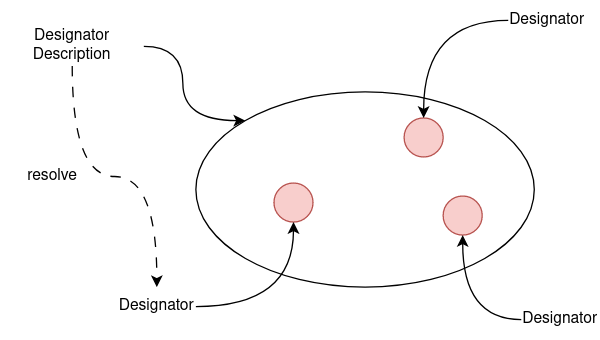
The description the set of all possible options, given the constraints and the grounded instance is one specific option that is picked from that set. If the grounded instance fails, the system can go back to the description and try another option.
How they are created and used (conceptually)#
1) Start with intent#
You describe the goal in abstract terms: which object, which kind of action, what constraints (arm preference, approach direction, safety, etc.). This is the description.
2) Let the system propose options#
From that description, the system can generate one or more candidates: feasible poses to stand at, grasps that fit, or motion variants that respect constraints.
3) Ground when executing#
Only when the plan gets to that step are concrete choices made. The system picks a candidate (or tries a few) that fits the live situation and turns the description into an executable step.
4) Execute and monitor#
The grounded designator is carried out. If it fails (e.g., object moved, pose blocked), the plan can try alternative candidates or recovery strategies.
The four kinds of designators#
Action designators
Express a task at the highest level of “do this,” such as grasping or opening something.
Internally, they can combine several motions, actions, locations, and sub‑steps.
They check basic conditions before and after, to ensure the task makes sense and succeeds.
Motion designators
Represent concrete robot movements (move joints, move a tool center point, open/close a gripper, etc.).
They are the last step before sending commands to the robot controller (process module).
Location designators
Propose good places and orientations for doing something (e.g., where to stand to see or reach an object, where to place an item).
They balance feasibility (reachability, visibility, collision‑free) and preference (shorter, safer, semantically meaningful).
Object designators
Refer to “what” the robot acts on (e.g., a particular cup, drawer handle, or surface).
Often come from the world model or perception; they can be precise (“this exact item”) or described more loosely upstream.
How designators fit into a plan#
Designators are what make up a plan. They are structured using the plan language to shape the control flow and error handling. The plan records the life cycle of a designator as well, meaning a designator description in the plan has its grounded instances as children.
Key Points: - Plans are trees of steps. Some steps organize flow (sequence, parallel, try alternatives); others perform work. - When a plan step encounters a description, it grounds it using the current world and robot. - If a step fails, the plan can try the next candidate, choose a fallback, or escalate to recovery.
Benefits you get#
Designator should provide a natural and easy to use interface to define robot behavior. This behavior should generally not be constrained to one robot but work across a wide variety of robot platforms.
Clarity: Describe “what” you want; let the system compute the “how.”
Flexibility: The same task description adapts across scenes and robots.
Robustness: Multiple candidates and late decisions improve success under uncertainty.
Composability: High‑level tasks are built by nesting actions, locations, and motions.
Typical usage patterns#
Describe an action at a high level (what to do, with which object, preferred arm).
Add a location description to suggest feasible poses or approach directions.
At run time, the system grounds the action and location into concrete steps and executes them.
Monitor results; if something goes wrong, iterate other candidates or choose a fallback action.
Common pitfalls and how designators help#
Things move: Because choices are made late, the robot adapts to the new situation.
One‑size‑fits‑all fails: Different robots or rooms require different concrete parameters; descriptions abstract those away.
Over‑specification: Hard‑coding exact poses often breaks; location descriptions produce safe, reachable alternatives.
Key takeaways#
Use designator descriptions to express intent and constraints, not fixed values.
Rely on grounding at execution time to pick concrete, feasible solutions.
Action vs. Motion vs. Location vs. Object roles:
Action = “do something” at task level.
Motion = “move like this” at controller level.
Location = “good places/poses to do it.”
Object = “the thing to act on.”
Plans orchestrate the whole process: they ground, execute, and recover as needed.